Kit Info.
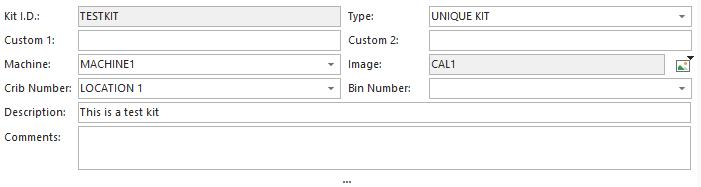
Kit Info. Dialog
The Kit Info dialog is used to specify basic kit information.
Kit I.D. - This field uniquely identifies this kit from all kits in the selected company. This is a required field - 20 characters. You can right-click on the field to add an auto number set up using 'Utilities: Autonumbering setup' from the main menu. You can change this ID later by selecting 'Options: Modify ID.'
Type - The Type field is used to identify the type of kit being entered. There are two options: Unique Kit and Kit Template.
·Unique Kit: This type of kit must be checked in and back out before reusing. These types of kits usually contain a mix of specific equipment IDs and 'generalized' equipment.
·Kit Template: This type of kit is reused over and over. It is never checked out and would almost always contain 'general' Kit Contents. (not specific equipment IDs).
Custom 1 - This custom field can be used to describe a kit. This information is stored on the workstation, not in the database.
Custom 2 - This custom field can be used to describe a kit. This information is stored on the workstation, not in the database.
Machine - This field can associate the kit with a machine.
Image - This field can associate a kit with an image. To add an image, press the  button and select 'Insert Image...'.
- Use the resulting dialog to select a kitting image from the IndySoft database (previously saved kit images) or create/name a new image from a jpeg file on your PC.
- To clear the image, press the
 button and select 'Clear Image...'
button and selecting the 'View Image' option or selecting the 'View...Kit Image...' menu option. Either method will display a popup window showing the kit image. The size/position of this popup window will be saved per workstation upon exit of the Kitting Module.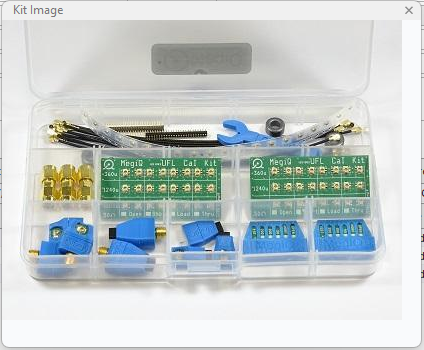
Kit Image Popup Window
Crib Number - This field can be used to store the equipment's main 'Storage' location. This corresponds to the 'Crib Number' field on the IndySoft main screen...Additional Info tab.
Bin Number - This field can be used to store the equipment's main 'Sub-Storage' location. This corresponds to the 'Bin Number' field on the IndySoft main screen...Additional Info tab.
Description - Description is used to specify a general description of the kit.
Comments - Place any additional comments about the Kit here.
-
-
- |
-