User/Location Settings - Interface
The Interface tab contains settings that control how the UI will look to that specific user. This includes layouts as well as color themes. In version 13, new field layouts were introduced, and users now have the ability to switch between old and new layouts.
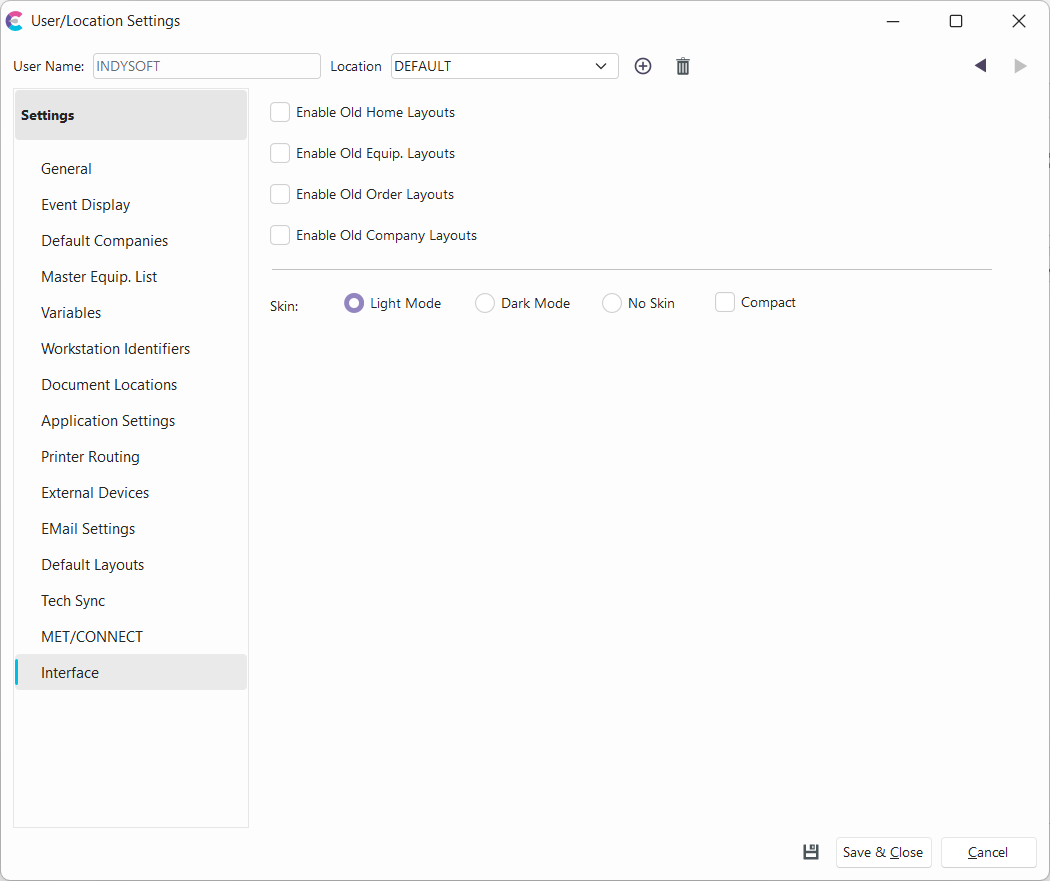
User/Location Settings - Interface
For example, let's say you just upgraded versions from 12 to 13 and do not have any field layouts created for use yet. In that case, you can check the options to use 'Old Layouts', and users will continue to see the layouts to which they are accustomed. This gives the administrator time to set up the field layouts as intended before checking off the option to use old layouts in the Interface tab.
Enable Old Home Layouts
When checked, this option will use old Home layouts in the UI for the specified user.
Enable Old Equip. Layouts
When checked, this option will use old Equipment layouts in the UI for the specified user.
Enable Old Order Layouts
When checked, this option will use old Order System layouts in the UI for the specified user.
Enable Old Company Layouts
When checked, this option will use old Company layouts in the UI for the specified user (right-hand panel of Company tab).
Skin:
- Dark - if selected, the color theme of the UI for the specified user will be dark.
- Light - if selected, the color theme of the UI for the specified user will be light (default).
- No Skin - if selected, no skin will be used. Can be helpful for troubleshooting.
- Compact (checkbox)- if checked, the format of the UI for the specified user will be compact.